16 July 2023

M2 Forestry and LiDAR

 This week’s lab work involved working with a raster dataset of the Shenandoah National Park, Virginia. The data files are quite large so there were issues with loading the maps with all the finished data. We used several geoprocessing tools to produce the final map results of canopy density, digital elevation model, digital surface model, and LiDAR file. LiDAR(Light Detection and Ranging) allows for more precise information to be recorded on the Earth’s surface. 

In this lab, we calculated the forest height and biomass density of the vegetation compared to the ground. Below are the tools we used in this lab. 
Tools used for forest height.
*Point File Location = summarizes the contents of the LAS files, returning the minimum bounding rectangle, number of points, average point spacing, and min/max z-values.
*LAS Dataset to Raster = creates a DEM and DSM based on ground or non-ground points
*Minus = produces a tree estimation
Tools for calculating biomass density. 
*LAS to MultiPoint = creates multi-point features using LiDAR files. The results are vegetation and ground. (Each tool beyond is duplicated for ground and vegetation.) 
*Point to raster = Converts a raster dataset to point features.
*Is Null = Creates a binary file where 1 is assigned to all values that are not null.
*Con = Performs a conditional if/else evaluation on each of the input cells of an input raster.
*Plus = Combines sum of raster counts.
*Float = Converts each cell value of a raster into a floating point.
*Divide = Divides the values of two rasters on a cell-by-cell basis.

The initial LiDAR file required each of the aforementioned tools to be processed for canopy density. The final results of the canopy density map show the values of 0 and 1. The 0 represents the lowest density while the one represents the highest density of vegetation. 

The information in the density map portrays the difference between the vegetation and ground points. This can be helpful to foresters for conservation planning in tree harvesting, terrain assessment for erosion control based on ground cover, identification and care of trees, and protecting forests as a whole. The density map aids foresters in forest maintenance more efficiently through maps. Remote sensing offers great detail through LiDAR providing foresters with more detailed maps beyond the usual topographic map.

Final Density map


Shenandoah National Park


09 July 2023

M1 Crime Analysis

 For this week’s lab assignment, we performed crime analysis for the Washington, D.C., and Chicago areas. In the first part of the lab, we created choropleth maps using data already provided to us. Performing spatial joins between feature classes gave us results for high burglary rates in the D.C. area. The latter part of the lab consisted of three parts using three different methods of identifying and visualizing hotspots in the city of Chicago. In this part of the lab, we are comparing the techniques in analyzing crime data; Grid Based, Kernel Density, and Local Moran's I. Through completing each of these steps we had to perform a spatial join, select by attributes, create layers from selection, and other geoprocessing steps to get the final output.

After setting up the environment for Chicago, I performed different geoprocessing operations to get the data for the number of homicides occurring in specific areas. The first analysis involved adding the clipped grid cells and the 2017 homicide layers and then spatially joining them. The Grid Based analysis is simple with the results based on a grid overlay of an area of .50 mile cells that are clipped to the Chicago boundary. To find areas with the highest rate of homicide I used the select by attributes to get rates greater than zero and manually counted the top 20%, the top quintile equal to 62. I added a field for these, exported the layer, and used the Dissolve tool for a smooth service area.

The Kernel Density Analysis uses search distance from the radius outward from a point of the highest value. This analysis covers a large area and accounts for outliers. The Kernel Density toolset was used in the analysis of this part. The same data from the Grid Based analysis were used. The toolset parameters needed to be set up with input features, distance, and because rasters are used in this analysis cell size and an output raster needed to be designated. After reclassifying the data for two break values, calculated by multiplying 3 times the mean, and converting the raster to a polygon, I selected attributes having a value of two giving me the final output. The output numbers were different from the Grid Based.  

The Local Moran’s I identifies significant clusters and outliers in data. Using the same data for this analysis the output numbers were different from the previous two. Local Moran’s I used weighted features to get results, the parameters for this were the number of homicides per 1000 housing units for the Chicago area. The geoprocessing tool is Cluster and Outlier Analysis (Anselin Local Moran's I) for calculating spatial analysis statistics for the number of homicides. The output of the analysis gave me four classifications for homicides per household, the high-high cluster result is the only one used for the Dissolve tool setup.

The differences between these after calculating the results are noted in the table below for the numbers calculated. Which is better? I think Kernel Density given that a search from the point with the highest value radiating outward. The calculated result is the magnitude per unit of the cell within the study area so a per unit (cell) from a specified point of high value will give more accurate results.

Local Moran's I map

Kernel Density map

Grid-Based Analysis map


30 June 2023

About me

Hello again. It is amazing how fast time goes. Life can give a person whiplash sometimes, especially with a quick turn on the class schedule. It is always good to see familiar names. My first name is Jerome but I go by Chris. I have just finished GIS Programming in the first half of the summer term. That was one of the toughest classes I have taken since Statistics. I am enrolled in the Master's GIS Admin program which is very exciting but a bit overwhelming at the same time. I have enjoyed my GIS adventure so far. There is always so much to learn. I had courses in GIS many years ago but that was such a long time ago now. 

I live in Pensacola and work from home for the UWF Bookstore full-time. Upon completion of the program, or before, I hope to move over to a GIS job and perform GIA analysis until I am no longer able to.  Meanwhile, I look forward to being able to help in this class when I can. I wish you all the best of luck.

https://storymaps.arcgis.com/stories 

27 June 2023

M6 Working with Geometries

Script results
Text file
ArcGIS output

Pseudocode

Start 

Set up

Prepare to write text file

Create(write) text file

Create variables

Field 1 = Feature/row OID 

Field 2 = Vertex ID 

Field 3 = X coordinate  

Field 4 = Y coordinate 

Field 5 = Name of the river feature 

Create for loop

Close text file 

Delete row and cursor variables outside of all loops

Stop


Flow chart

This week’s assignment was the culmination of the last six weeks of working with scripts. We worked with geometries and covered the topics of Nested loops, Search cursors, For loops, Writing to a TXT file, and Creating loops within a loop. It was a challenge to put together but using information and script templates from previous assignments helped me compile scripts to deliver the results. It is one lengthy script made up of several smaller ones. I had struggles with indentation and syntax specifically when writing the data to the text file which required a series of “for loops”. In the files above you can how the same results are different when they are viewed.


As I said it helps me to keep a notepad of scripts we must use to complete exercises. This week was consistent with previous weeks of reminding me to read through each script to ensure better understanding. This allows me to make mental notes of proper syntax. I created a notepad of scripts from completed exercises before beginning the assignment. This is very helpful in narrowing my focus to the script and helps me to understand it better. For this assignment, I went back to exercise 5’s scripts I saved as notes to get me going. Courses such as this have a way of “forcing “ me to be better organized and to find the greater detail in the details.


18 June 2023

M5 Explore and Manipulate Data


Scripts results
Module Flowchart


This week's module was exciting to put together and run.  For the assignment, we had to set up a workspace, create a file geodatabase (fGDB), list all feature classes while assigning the list to a variable, copy features from the Data folder into the new fGDB, create a Search Cursor for the cities feature class, create an empty dictionary named county_seats, and populate the dictionary with the names (keys) and populations (values) of all County Seat cities. It was a lot of information that went into the assignment and then making sure all of the details were correct was time-consuming. 

Once again the task of creating a script was a matter of following through on the exercise step-by-step. I am the person that has to go by the numbers and programming is certainly built that way. Ensuring the syntax, tasks, and verbiage are all inputted correctly is rewarding when the output is as it should be, mostly. I had trouble with using the two formats for adding pairs to a dictionary from the assignment. The formula is given to us from the assignment but I just could not get it to work, even though I tried many different ways of adding the information. 

14 June 2023

M4 Geoprocessing


Geoprocessing script result

Model build with tools used at the top

Map output of the model build


This week's module took me into geoprocessing, model building in ArcGIS, and, of course, more Python scripts. There was some editing of scripts to get the desired results as I needed to be sure I was using the correct folder for the results and not simply saving everything to the same folder. 
In building the model I had to open the toolbox under the analysis tab and then click and drag the desired tool to the model builder. The challenge was getting the order correct, the input and output features, and what is being clipped and by what. Once I finished this part I needed to write a script for geoprocessing. The scripts were for creating a buffer around a shapefile, dissolving the buffers into a single feature, and finally adding XY coordinates to the shapefile. 
On this side of things, with it all completed, it is easy to say it was not too bad but when something is wrong in the format, file path, or some unfamiliar error it can be frustrating. As time has gone by in this class, I have found it to be rewarding and enjoyable to be challenged with different material.

07 June 2023

M3 Debugging and Error Handling

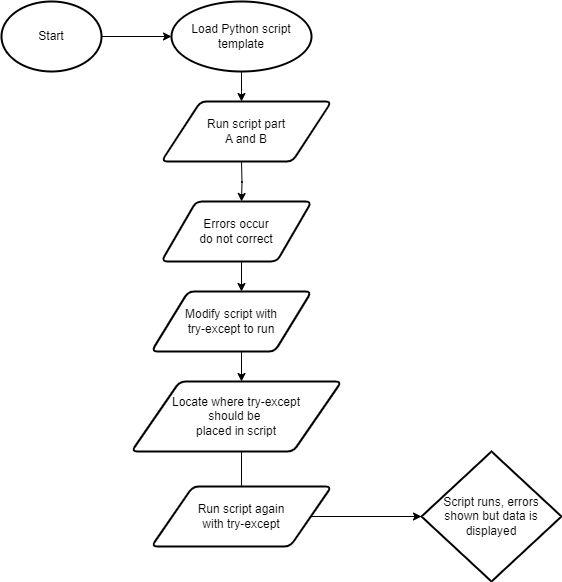
This week's module challenged us to find more errors and added a try-except statement to bypass an error in a script. This accounts for the error and still prints (displays) the data. I cannot say it has gotten easier "dealing" with Python programming but things certainly make more sense when I see and am able to correct errors. When presented with a script pause to look at it before running it, and pick out obvious errors that are present. Of course, the caveat is when the script runs, errors will present themselves where they were not visible before. 

The errors in the script could be misspelled words (ex. reference vs. reference or map vs. maps) or punctuation. Whatever they may be that is the point of each week's assignment and it never disappoints to frustrate and once scripts run correctly, feel the great thrill of victory. We had three scripts this week to find errors and run correctly, one of which introduced a try-except statement that accounts for the error but still runs. As Dr. Morgan and also in Agarwal's readings have reiterated several times, flow charts help create a path of enlightenment through the process of writing, editing, correcting, and completion of running the script with the correct response.

Script 1 results


Script 2 results


Script 3 results


Try-Except flow chart


UWF Student. Aspiring GIS Analyst.

Website and portfolio

For this blog post I will be talking about a part of my portfolio shown through my website which includes some examples of project work from...